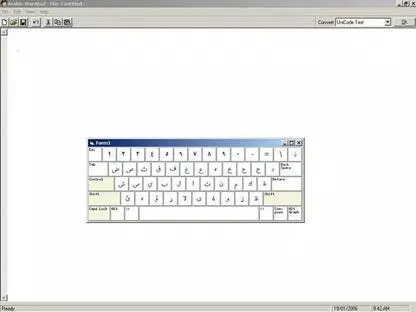



Download Arabic Keyboard – Arabic typing, keyboard layout, PC typing, Arabic input, easy installation, Internet Explorer 5.5
Overview
Arabic Keyboard is a specialized tool designed to simplify Arabic typing on Windows-based personal computers. The application enables users to input Arabic text efficiently without relying on complex software or system-level configurations. It is particularly useful for individuals who frequently write in Arabic but lack access to built-in Arabic keyboard support or prefer a lightweight, standalone solution. The app addresses common challenges such as layout conflicts, dependency issues, and complicated setup procedures that often hinder Arabic input on older or non-optimized systems.
Target users include students, professionals, content creators, and anyone needing consistent Arabic text entry across various applications. The developer, PCFone, has positioned the tool as a no-frills utility focused on reliability and compatibility. Although specific details about the company’s background were not provided, the app’s longevity—released in 2004—suggests a stable, niche product with enduring relevance in specific use cases.
Real-world applications include writing emails, drafting documents, creating web content, and entering Arabic data in spreadsheets or databases. Its independence from other keyboard systems makes it ideal for environments where multiple input methods are used. In the broader app ecosystem, Arabic Keyboard fills a gap for lightweight, low-overhead solutions in multilingual computing, especially on legacy systems where modern input methods may not function optimally.
Key Features & Functionality
- Easy Installation – The app can be installed quickly with minimal user intervention. No complex setup steps or additional software packages are required, making it accessible even to users with limited technical experience.
- No Dependencies – Arabic Keyboard operates independently, relying only on Internet Explorer 5.5 or higher for basic runtime support. This design minimizes conflicts with other installed software and reduces system overhead.
- Compatibility Across Systems – The tool is not affected by the presence of other keyboard layouts or input systems. Users can switch between Arabic and other language inputs seamlessly without configuration issues.
- User-Friendly Typing Interface – The keyboard layout is intuitive and designed to mirror standard Arabic typing patterns, reducing the learning curve and increasing typing speed over time.
- Versatile Application Support – Arabic Keyboard functions across a wide range of software, including word processors, web browsers, email clients, and database tools, ensuring consistent performance regardless of the target application.
For example, a user writing a research paper in Arabic can install the keyboard once and use it across Microsoft Word, Notepad, and online forms without reconfiguration. Similarly, a business professional entering Arabic customer data into a spreadsheet can rely on consistent key mapping without system interference. These use cases demonstrate the app’s practicality in both academic and professional settings.
Interface, UX & Performance
The interface of Arabic Keyboard is designed with simplicity and functionality in mind. It features a clean, minimal layout focused on core typing tasks, avoiding unnecessary visual clutter. Navigation is straightforward, with no complex menus or layered settings, allowing users to begin typing in Arabic immediately after installation.
Although the developer did not list formal performance metrics, the app’s lightweight nature—only 3.2 MB in size—suggests efficient resource usage. It is expected to run smoothly on older Windows systems with limited processing power and memory. Responsiveness is likely to be high due to the minimal codebase and lack of background processes.
Stability is a key strength, especially in environments where multiple input methods are active. The app’s independence from other keyboard systems reduces the risk of crashes or layout corruption. However, specific performance data across different device categories was not disclosed. Users are advised to test compatibility on their specific hardware, particularly if using outdated systems.
Platform Compatibility & Technical Requirements
Arabic Keyboard is designed exclusively for the Windows platform. It is compatible with Windows operating systems, though the exact version requirements were not specified by the developer. The app requires Internet Explorer 5.5 or a newer version to function, which may limit its usability on modern Windows versions that no longer support this legacy browser.
The application size is 3.2 MB, indicating a lightweight footprint suitable for systems with limited storage. The software version is 1.0, suggesting it has not undergone major updates since its initial release in 2004. As such, users should be aware that the app may not support newer Windows features or security protocols.
Compatibility information was not fully disclosed. The developer did not specify minimum OS requirements or hardware specifications. Users are encouraged to verify system compatibility before installation, especially when using the app on updated or non-standard Windows environments.
Pros and Cons
Pros
- Lightweight installation with minimal system impact
- Easy setup and immediate usability
- Operates independently without software dependencies
- Compatible with multiple applications and workflows
- Free to download and use
Cons
- Requires Internet Explorer 5.5 or higher, which may not be available on modern systems
- Limited to Windows platform; no support for macOS or mobile devices
- No recent updates or official support since 2004
- Interface and design may appear outdated by current standards
- Compatibility with newer Windows versions is uncertain
FAQ
Is Arabic Keyboard safe to install?
Yes, the app is free and designed for basic Arabic input. However, users should ensure they download it from trusted sources, especially given its age and reliance on legacy software.
Can I use Arabic Keyboard on modern Windows versions?
Compatibility with newer Windows versions is not guaranteed. The app depends on Internet Explorer 5.5 or above, which is no longer supported in recent Windows releases.
Do I need to install additional software?
No. Arabic Keyboard only requires Internet Explorer 5.5 or higher. No additional tools or drivers are needed for basic functionality.
Is Arabic Keyboard available for Android or iOS?
Currently, the app is only available for Windows. There is no official version for mobile platforms.
How often is the app updated?
The app has not been updated since its release in 2004. Users should expect no new features or security patches.
Final Thoughts
Arabic Keyboard remains a niche but functional tool for users who need a simple, standalone solution for Arabic input on older Windows systems. Its minimal footprint, ease of installation, and independence from other software make it a reliable choice in specific scenarios. While it lacks modern features and support, its core purpose—efficient Arabic typing without complexity—remains valid for certain users.
Those who work with legacy systems, require basic Arabic input, or are limited to older software environments will benefit most from this app. Its free status and straightforward design add to its value proposition. However, users on current Windows versions should consider alternative solutions with updated support.
Download Arabic Keyboard now


